$ cat posts/fix-infinix-air-pro-plus-quad-speakers-linux.md
Fix Infinix Air Pro+ Quad Speakers in Linux
A fix for Infinix Air Pro+ -- only 2 of 4 speakers working in Linux
The Infinix Air Pro+ has four speakers — a tweeter pair and a woofer pair. On Linux, only two of them activate by default. The audio sounds thin as a result. This is how to get all four working.
Finding the Hidden Nodes
ALSA sees the hardware but doesn’t always know what to do with every output node. Dump the codec info to see what’s there:
$ cat /proc/asound/card0/codec* | grep -i "node"
State of AFG node 0x01:Node 0x02 [Audio Output] wcaps 0x41d: Stereo Amp-OutNode 0x03 [Audio Output] wcaps 0x41d: Stereo Amp-OutNode 0x04 [Vendor Defined Widget] wcaps 0xf00000: MonoNode 0x05 [Vendor Defined Widget] wcaps 0xf00000: MonoNode 0x06 [Audio Output] wcaps 0x611: Stereo DigitalNode 0x07 [Vendor Defined Widget] wcaps 0xf00000: MonoNode 0x08 [Audio Input] wcaps 0x10051b: Stereo Amp-InNode 0x09 [Audio Input] wcaps 0x10051b: Stereo Amp-InNode 0x0a [Vendor Defined Widget] wcaps 0xf00000: MonoNode 0x0b [Audio Mixer] wcaps 0x20010b: Stereo Amp-InNode 0x0c [Audio Mixer] wcaps 0x20010b: Stereo Amp-InNode 0x0d [Audio Mixer] wcaps 0x20010b: Stereo Amp-InNode 0x0e [Vendor Defined Widget] wcaps 0xf00000: MonoNode 0x0f [Audio Mixer] wcaps 0x20010a: Mono Amp-InNode 0x10 [Vendor Defined Widget] wcaps 0xf00000: MonoNode 0x11 [Vendor Defined Widget] wcaps 0xf00000: MonoNode 0x12 [Pin Complex] wcaps 0x40040b: Stereo Amp-InNode 0x13 [Vendor Defined Widget] wcaps 0xf00000: MonoNode 0x14 [Pin Complex] wcaps 0x40058d: Stereo Amp-OutNode 0x15 [Pin Complex] wcaps 0x40058d: Stereo Amp-OutNode 0x16 [Vendor Defined Widget] wcaps 0xf00000: MonoNode 0x17 [Pin Complex] wcaps 0x40050c: Mono Amp-OutNode 0x18 [Pin Complex] wcaps 0x40058f: Stereo Amp-In Amp-OutNode 0x19 [Pin Complex] wcaps 0x40058f: Stereo Amp-In Amp-OutNode 0x1a [Pin Complex] wcaps 0x40058f: Stereo Amp-In Amp-OutNode 0x1b [Pin Complex] wcaps 0x40058f: Stereo Amp-In Amp-OutNode 0x1c [Vendor Defined Widget] wcaps 0xf00000: MonoNode 0x1d [Pin Complex] wcaps 0x400400: MonoNode 0x1e [Pin Complex] wcaps 0x400781: Stereo DigitalNode 0x1f [Vendor Defined Widget] wcaps 0xf00000: MonoNode 0x20 [Vendor Defined Widget] wcaps 0xf00040: MonoNode 0x21 [Vendor Defined Widget] wcaps 0xf00000: MonoNode 0x22 [Audio Mixer] wcaps 0x20010b: Stereo Amp-InNode 0x23 [Audio Mixer] wcaps 0x20010b: Stereo Amp-InState of AFG node 0x01:Node 0x03 [Audio Output] wcaps 0x6611: 8-Channels DigitalNode 0x04 [Pin Complex] wcaps 0x40778d: 8-Channels Digital Amp-Out CPNode 0x05 [Audio Output] wcaps 0x6611: 8-Channels DigitalNode 0x06 [Pin Complex] wcaps 0x40778d: 8-Channels Digital Amp-Out CPNode 0x07 [Audio Output] wcaps 0x6611: 8-Channels DigitalNode 0x08 [Pin Complex] wcaps 0x40778d: 8-Channels Digital Amp-Out CPNode 0x09 [Audio Output] wcaps 0x6611: 8-Channels DigitalNode 0x0a [Pin Complex] wcaps 0x40778d: 8-Channels Digital Amp-Out CPNode 0x0b [Pin Complex] wcaps 0x40778d: 8-Channels Digital Amp-Out CPNode 0x0c [Pin Complex] wcaps 0x40778d: 8-Channels Digital Amp-Out CPNode 0x0d [Pin Complex] wcaps 0x40778d: 8-Channels Digital Amp-Out CPNode 0x0e [Pin Complex] wcaps 0x40778d: 8-Channels Digital Amp-Out CPNode 0x0f [Pin Complex] wcaps 0x40778d: 8-Channels Digital Amp-Out CP
The nodes worth paying attention to:
0x14— Stereo Amp-Out (the active front speakers)0x15— Stereo Amp-Out (another output, likely inactive)0x18,0x19,0x1a,0x1b— Stereo Amp-In Amp-Out (candidates for the extra pair)
Enabling the Extra Speakers with hdajackretask
hdajackretask is an ALSA tool that lets you reassign what each node does. Install it:
$ sudo pacman -S alsa-tools$ sudo hdajackretaskOnce open, enable Show unconnected pins to see all the nodes that can be retasked. After some trial and error: 0x1a and 0x1b are the nodes for the second speaker pair. Override them and set their role to Internal Speaker.
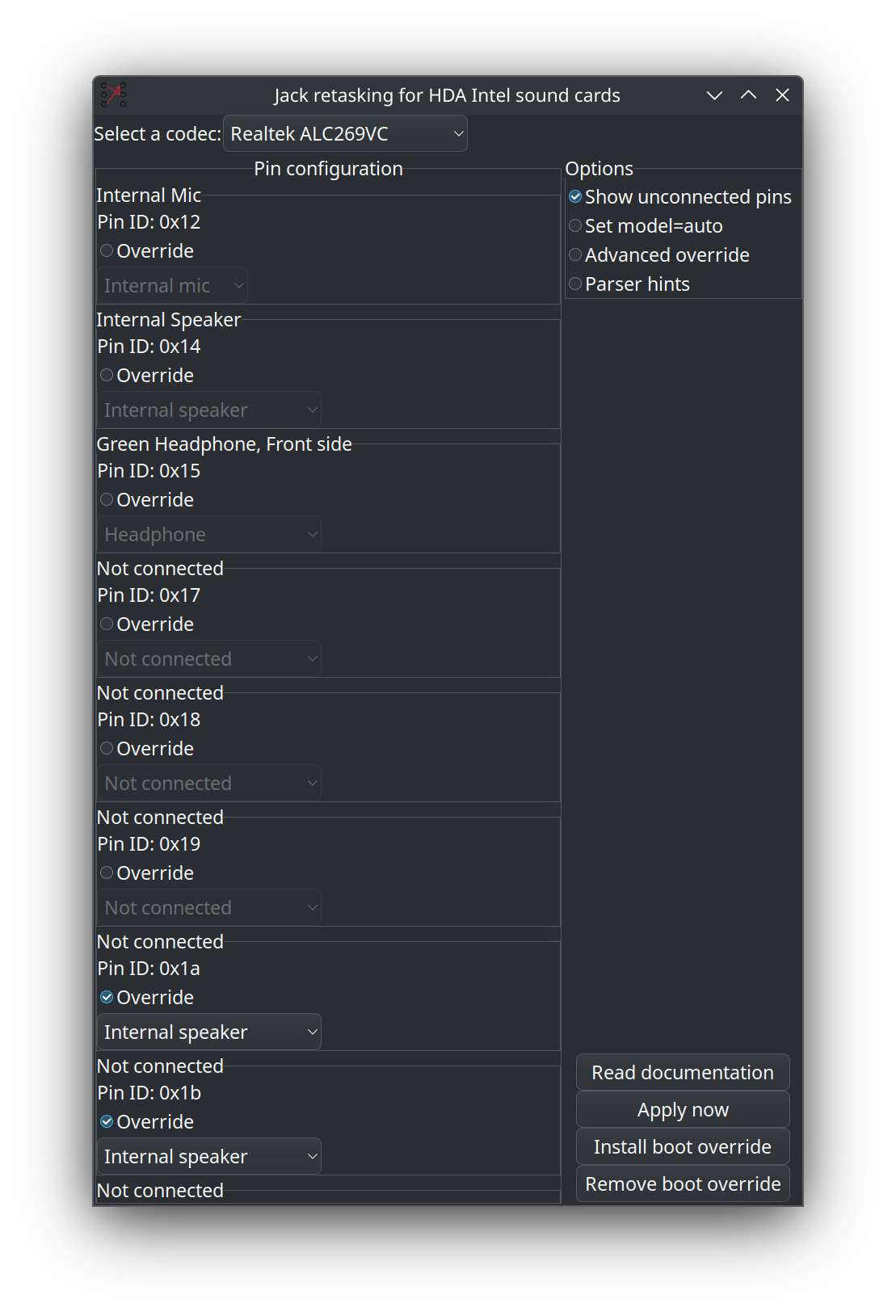
All four speakers active.